
Practical guide
Build an installed-graphics register a second person can use
Give every unit a stable reference and keep unknown information visibly unknown.
Read the guide: Build an installed-graphics register a second person can useChicago commercial vehicles & fleets
Keep your commercial graphics consistent as vehicles join, change or need repairs. Start with clear artwork and vehicle records.
Guaranteed response within 2 hours.Free planning tools and buyer downloads below.
A clear scope before the spend.
Free installed fleet graphics register below. Use the result with any wrap shop.
More useful project detail
Use the installed-graphics register to keep vehicle, artwork and material references together. These guides focus on additions, repairs and evidence that stays useful after installation.

A visual you can keep
A register should point to evidence and preserve meaningful changes.
Use the planning example from Chicago Fleet Wraps, download a copy, or read the related project guides.
Practical guide
Give every unit a stable reference and keep unknown information visibly unknown.
Read the guide: Build an installed-graphics register a second person can usePractical guide
Connect the damaged panel, installed version and available production references.
Read the guide: Request a fleet graphics repair from the vehicle recordPractical guide
Track additions, transfers, rebrands and retirement without losing the installed history.
Read the guide: Keep graphics records useful when vehicles changeWhy put your business on a vehicle?
Keep the important colors, wording and identity consistent across the vehicles.
Keep vehicle and artwork records so the next unit starts from an agreed reference.
Plan batches, approvals and vehicle availability before agreeing the rollout.
Picture the possibilities
Look at the message, the coverage and the working views.
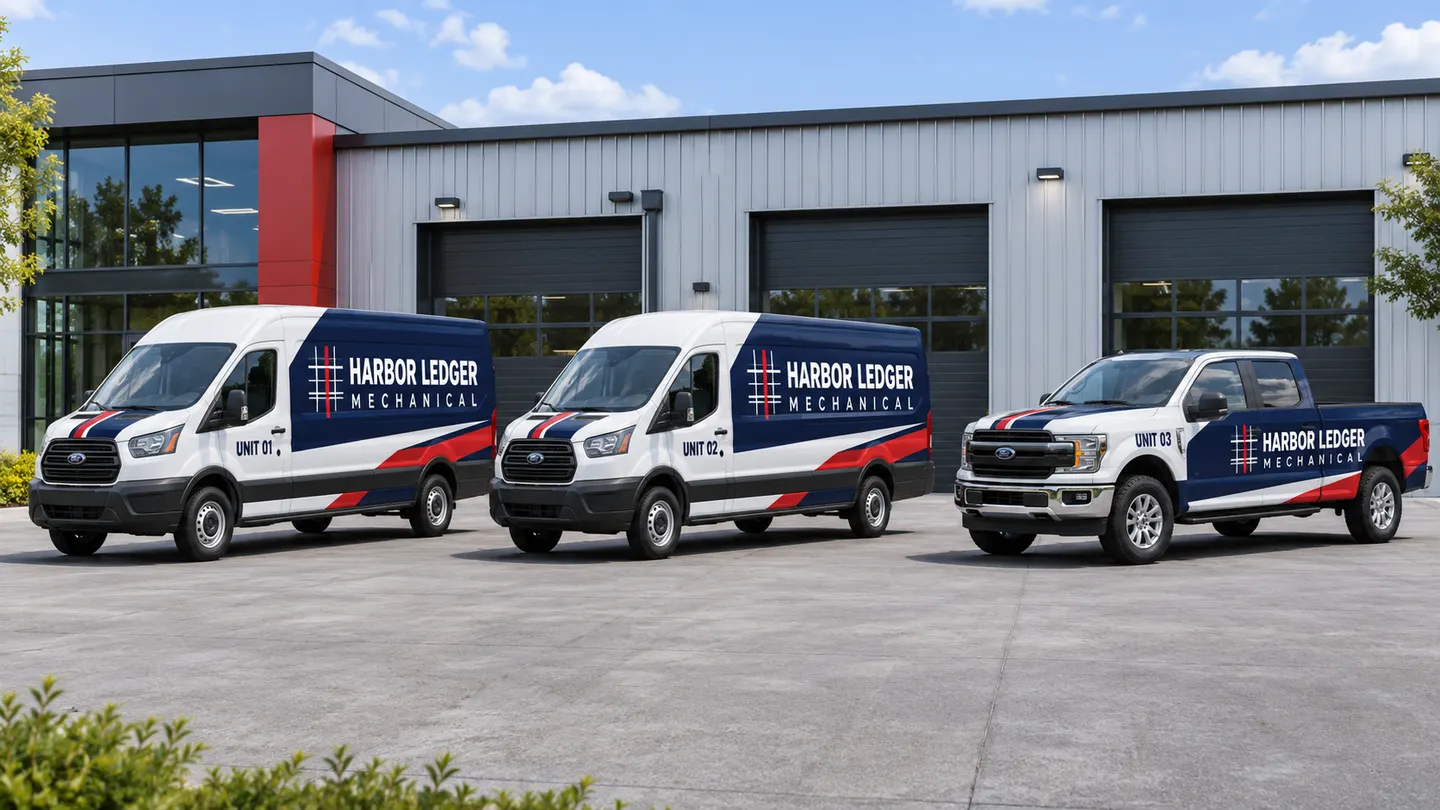
Harbor Ledger Mechanical is a fictional business. These generated design concepts illustrate ideas to discuss for your vehicles.
Plan the graphics for your vehiclesA clear scope before a price
Vehicle size, covered areas, artwork, preparation, existing graphics and the proposed material system all belong in the price discussion.
Useful when the priority is a clear name, service and contact route.
Discuss this scopeCompare the exact panels, message and finish with the full-coverage option.
Discuss this scopeConfirm the included painted panels and any exclusions on the actual vehicle.
Discuss this scopeRequest a price for the actual vehicles and agreed coverage. The free tools below help you compare the assumptions.
Let’s talk vehicles
Tell us how many vehicles you have. We’ll follow up about the vehicles, coverage, design and timing.
Guaranteed response within 2 hours.Know the next step
Guaranteed response within 2 hours. Final project pricing and dates follow review of the scope.
Name, email, phone and vehicle count. Share the project context through the free tool if it is useful.
Discuss the actual vehicles, coverage, artwork, existing graphics and timing.
Check the written scope and vehicle-specific artwork, including the business wording and included surfaces.
Confirm scheduling, preparation, review and the applicable care information.
The free tool
Use the example values to explore, then replace them with your project details.
One vehicle per line: ID | configuration | art version | install date | material | replacement notes
Use the tool without sharing contact details. Entering a valid email or phone in the inquiry form saves your project entries, filenames, analysis and selected original files, even if unfinished. Original files: up to 50 MB each and 200 MB per batch.
Maintain this record after installations, repairs and replacements.
| Vehicle ID | Configuration | Art version | Install date | Material | Notes |
|---|---|---|---|---|---|
| VAN-01 | Transit | Brand v2 | 2026-11-01 | Confirm film | Rear panel note |
| VAN-02 | Sprinter | Brand v1 | Unknown | Unknown | Check old art |
Keep supplier records and exact film details with this register. Unknown entries stay unknown.
Ready to discuss the vehicles? Get fleet pricing. Save your result to use in that conversation.
Free tools for a better buying decision
A 12-page workbook with generic wrap concepts and fillable worksheets for coverage, quote comparison, budget, fleet availability, artwork, proof approval and vehicle records. Use it with any wrap shop.
Fill it in electronically or print it. No email needed.
Take this to any wrap shop
Print it off so you remember to ask. A practical checklist covering scope, materials, artwork, preparation, scheduling, warranty and handoff, plus questions for this project.
Confidence comes from the details
Use these checks when you review a proposal, a proof or a wrap shop. Keep the answers with your project.
Print the wrap-shop questionsSee the tradeoff
Two vehicles with different artwork versions stay separate in the register, even if they share a logo.
Illustrative values, not a completed customer project.
Maintain this record after installations, repairs and replacements.
| Vehicle ID | Configuration | Art version | Install date | Material | Notes |
|---|---|---|---|---|---|
| VAN-01 | Transit | Brand v2 | 2026-11-01 | Confirm film | Rear panel note |
| VAN-02 | Sprinter | Brand v1 | Unknown | Unknown | Check old art |
Keep supplier records and exact film details with this register. Unknown entries stay unknown.
Leave with something useful
Create a usable graphics register for replacements, repairs and the next fleet update.
Build my graphics registerBuild it from the project details you enter.
Keep the assumptions and open questions visible.
Copy, save or print the result for your next conversation.
Commercial wrap service
Manage fleet graphics with a vehicle register linking each unit to its body configuration, approved artwork, coverage, material information, and condition notes. Review new additions and damage against that record. Shared branding supports consistency, while vehicle-specific checks help prevent outdated artwork or unsuitable replacement assumptions from spreading through the fleet.
A fleet graphics program becomes difficult to manage when artwork, vehicle details, and replacement requests live in separate conversations. Similar vehicles may carry different body configurations or outdated contact information. A simple record for each unit gives the project a common reference. This guide focuses on keeping approved artwork connected to the vehicle, documenting its condition, and planning later additions or replacement components without assuming that every fleet unit is identical.
Use a stable fleet identifier to connect photographs, body details, artwork approvals, and installation information. Record meaningful differences such as roof height, box length, doors, windows, and fitted equipment. Keep current contact wording alongside the approved artwork version so replacements do not reproduce an obsolete number. The record need not be complicated, but it should be accessible to the people ordering work and scheduling vehicles. This gives a graphics request a concrete reference instead of relying on descriptions such as the white van or the truck from last year.
Photograph damage in context and close up, noting whether it affects a graphic edge, a complete component, or the body beneath it. Replacement scope depends on the installed construction and the condition of surrounding graphics. Outdoor weathering can change appearance, so a fresh component may not perfectly match adjacent material. Current 3M maintenance guidance recommends replacing entire components or the full wrap and warns that visible differences can remain after repairs. Treat a repair request as a condition assessment rather than assuming a small patch will recreate the original finish.
When a new vehicle arrives, check its actual configuration before reusing an existing layout. When the business changes its message or contact details, identify which approved artwork versions need updating and which units are affected. Build the rollout around the fleet's availability rather than treating a graphics revision as an instant change to every vehicle. Preserve the approved source files and record changes by unit. This approach keeps routine additions, rebranding, and damage replacement connected to the same visual standard while allowing the vehicle-specific adaptations that a mixed fleet requires.
Buy with the questions answered
Yes. Shared colors, typography and messages can connect a fleet while placement is adapted to each body. Group the vehicles by configuration and review each layout before repeating it.
Guaranteed response within 2 hours. The next conversation confirms the vehicle details, proposed coverage, artwork, existing graphics and timing so a project-specific scope can be discussed. Sending an inquiry does not reserve an installation date.
Review the covered surfaces, final business wording, vehicle-specific artwork, proposed material system, preparation and removal needs, price exclusions and agreed handoff. The free wrap-shop questions give you a record to use with any supplier.
Before you decide
For project-specific help, use the four-field inquiry form.
Get fleet pricingInclude the vehicle identifier, exact body configuration, current photographs, approved artwork version, coverage description, and any supplied material information. Add condition notes and replacement history when useful. The goal is a reliable reference that connects a request to the correct vehicle and prevents old artwork from being reused.
Read the detailed guide: Build an installed-graphics register a second person can use
No. The appropriate response depends on damage, construction, substrate condition, and weathering. A patch or replacement may look different from surrounding graphics. 3M recommends replacing entire components or the full wrap for vehicle maintenance and does not warrant repaired graphics under its maintenance guidance.
Read the detailed guide: Request a fleet graphics repair from the vehicle record
Vehicles with the same model name can have different wheelbases, roof heights, doors, windows, or installed equipment. Those differences affect layout and coverage. Compare the new unit with the approved configuration before reusing artwork, then document any adaptation so the fleet record remains accurate.
Read the detailed guide: Build an installed-graphics register a second person can use
Keep one approved source for public wording and link it to the current artwork version. Remove superseded files from the normal ordering path and identify affected vehicles when details change. Review contact information during every approval instead of assuming an old production file remains correct.
Read the detailed guide: Keep graphics records useful when vehicles change
Carry common colors, typography and messages across the fleet, then adapt placement to each vehicle. A layout that works on a trailer may need substantial changes on a cargo van.
3M sourceA damaged graphic may be assessed by complete component. Weathered material can differ in color and gloss from new prints, so a replacement panel should be reviewed alongside the remaining graphics.
3M sourceUse the finished graphic's care instructions, start with a mild cleaning method, test an inconspicuous area and avoid unnecessary abrasion. Cleaning compatibility depends on the finished graphic.
3M sourcePreparation, coverage, vehicle shape, existing graphics and the installation team affect downtime. Obtain a project-specific schedule before committing vehicles to a fleet rollout.
3M sourceFleet graphics records and rollout planning can support commercial vehicles operating in Chicago, Schaumburg, Hoffman Estates, and Elk Grove Village. Tell us about your vehicles.